 Brewin
01
A verified roaster badge
Your account carries a roaster badge on your profile, your posts, and your comments, so drinkers know they're hearing from the people who roasted the coffee.
Brewin for roasters
Claim your roaster profile on Brewin. Tell your story, publish your coffees, and meet the people who scan your bags, brew your beans, and rate every cup.
Free for roasters · Reviewed by a human · Usually approved within 1–2 business days
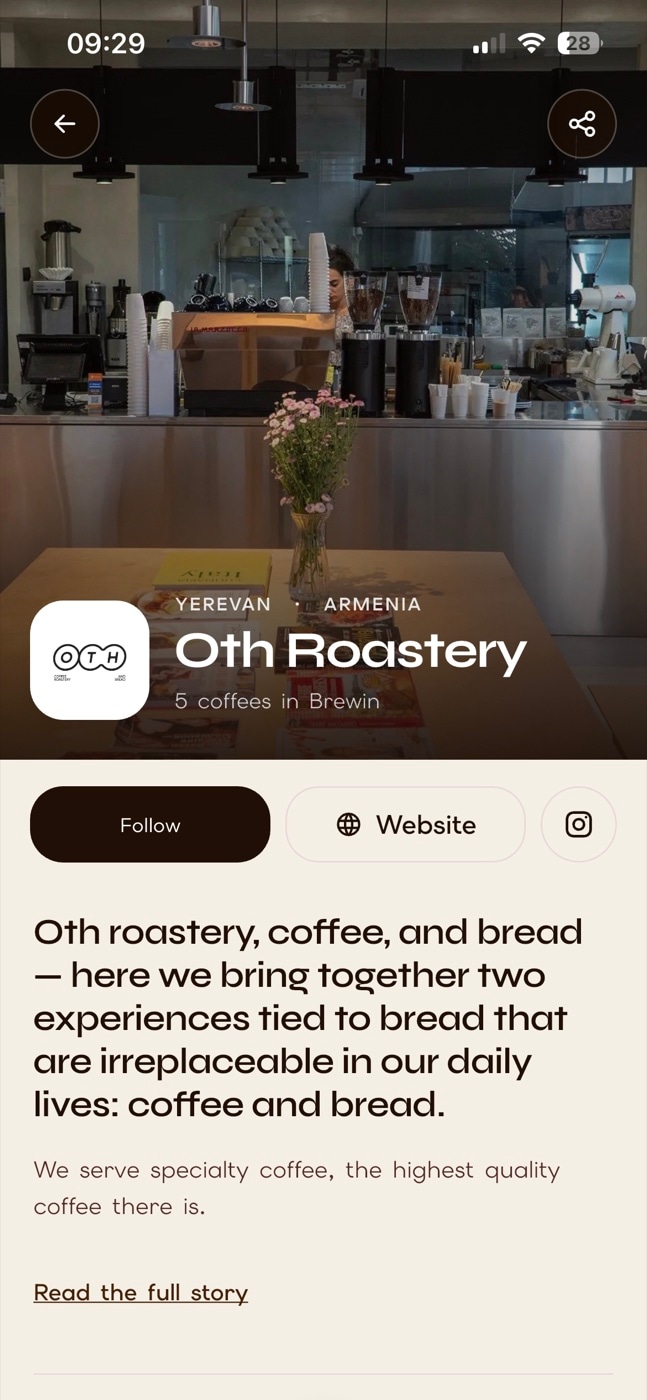
(public view)
What you get
Brewin already catalogues thousands of roasters and tens of thousands of coffees. A roaster account puts you in charge of yours.
Your account carries a roaster badge on your profile, your posts, and your comments, so drinkers know they're hearing from the people who roasted the coffee.
Banner, logo, a story headline in large type, your full story, country and city, website, Instagram, founding year, and the other names people know you by.
Publish your coffees with origin, process, variety, roast, tasting notes, and a photo. When someone scans your bag, Brewin matches it to your entry, not a guess.
Published profiles appear in the Discover tab, where drinkers search roasters by name, country, or website and browse catalogues.
Post new releases and brewing tips to the feed, build a following, and get mentioned in the community's brew posts.
Drinkers rate and review the coffees in your catalogue and log how they brewed them. Reviews stay attached even when you archive a coffee.
Manage coffees
Manage the coffees people see on your profile.
5
Published
1
Drafts
0
Archived
Ethiopia | Hambella
Ethiopia · Natural · Medium
Ethiopia | Uraga
Ethiopia · Washed · Medium
Colombia | Flor del Desierto
Colombia · Natural · Medium
Colombia | Elkin Guzman Finca Mirador
Colombia · Cofermented natural · Medium
Rwanda | Nyamasheke Hills
Rwanda · Natural · Medium
Kenya | Kirinyaga (next drop)
Kenya · Washed · Medium
(roaster's view)
Your catalogue
How it works
Open Brewin, tap “Continue as a professional account”, choose Roaster, and tell us about your roastery: name, location, business email, website, and Instagram.
A Brewin admin checks the application. Decisions usually take 1–2 business days, and you'll see the status in the app.
Approved applications get a secure invite by email. Open it on your phone to choose a username and password. Invites expire after 14 days.
Three short steps: brand identity, roastery details, and a review screen with a checklist. Save a draft at any point, or publish when everything is in place.
Add coffees one by one, keep unfinished ones as drafts, and archive what's no longer available. Published coffees become scan-ready automatically.
Not a roaster?
The same application flow covers other coffee professionals. Approved accounts get a professional badge and a presence in the community.
You run a cafe or coffee bar and want a professional presence in the community.
You publish coffee content and want a badge that sets your account apart.
You make brewing equipment and want to be part of the conversation.
Importers, green buyers, trainers: tell us who you are in the application note.
Questions
No. There is no fee to apply for a roaster account or to keep a roaster profile and catalogue on Brewin.
Brewin's catalogue already lists thousands of roasters and their coffees. When you apply, you can claim your existing entry. Once approved, the coffees, scans, and reviews already linked to it carry over, and you take over the public profile fields.
A banner image, a logo, your roaster name and handle, a story headline and story, your country, a website, and a verified business email. Until then your profile stays a private draft that is not shown in Discover.
Yes. Brewin supports multiple accounts on one phone. Switch between your personal and roaster accounts from Settings without signing out.
A coffee name and a photo at minimum. Origin, region, producer, process, variety, elevation, roast level, intensity, description, and tasting notes make the entry richer and help scans match reliably.
Archived coffees leave your public catalogue but keep their reviews and ratings, so a seasonal lot can come back next year with its history intact.
Only Brewin admins. Your business email, note to admin, and verification details are never shown on your public profile.
Download Brewin, tap “Continue as a professional account” on the welcome screen, and choose Roaster. Questions first? Email info@brewin.coffee.